Leave Your Message
0%

When it comes to choosing thermostat solutions for hotels, commercial buildings, or Smart Homes, it really all starts with understanding how each space is actually used. For example, a hotel guest might just want quick, private temperature tweaks, while the operations team needs consistent control across rooms and clear alerts if something’s off. Little things make a difference here. Placing a thermostat near a drafty window could give a totally different reading than one installed on an interior wall. So, factors like placement, sensor accuracy, and proper setup (or commissioning) all influence comfort and energy efficiency.

In commercial buildings, you often need features like scheduling, zoning, and seamless integration with existing Building Control Systems. Before picking out equipment, it’s a good idea for the project team to double-check wiring, communication protocols, control sequences, and maintenance needs. Doing these checks early on can save you from expensive surprises when it’s time to install. When it comes to smart home projects, the priorities change a bit—think intuitive interfaces, app control, and reliable device connections. Remote control is super handy, but only if everything’s set up properly and everyone understands how to use the system.

Honestly, there's no one-size-fits-all thermostat for every project. You’ll want to compare product specs, supported integrations, operating ranges, and support options based on what the building actually needs. Running a pilot setup can also help spot issues early—things that might not be obvious just from reading the specs. Even then, it’s important to review the results, because occupant habits, shifting schedules, and sensor placement can all influence how well it performs after the handover. The key to making good decisions is combining technical info with feedback from the people who will use and maintain the system. It takes time, and sometimes the first choice needs a bit of fine-tuning along the way.
Thermostat Solutions for Hotels, Commercial Buildings and Smart Home Projects

What Thermostats Do in Hotels, Commercial Buildings, and Smart Homes

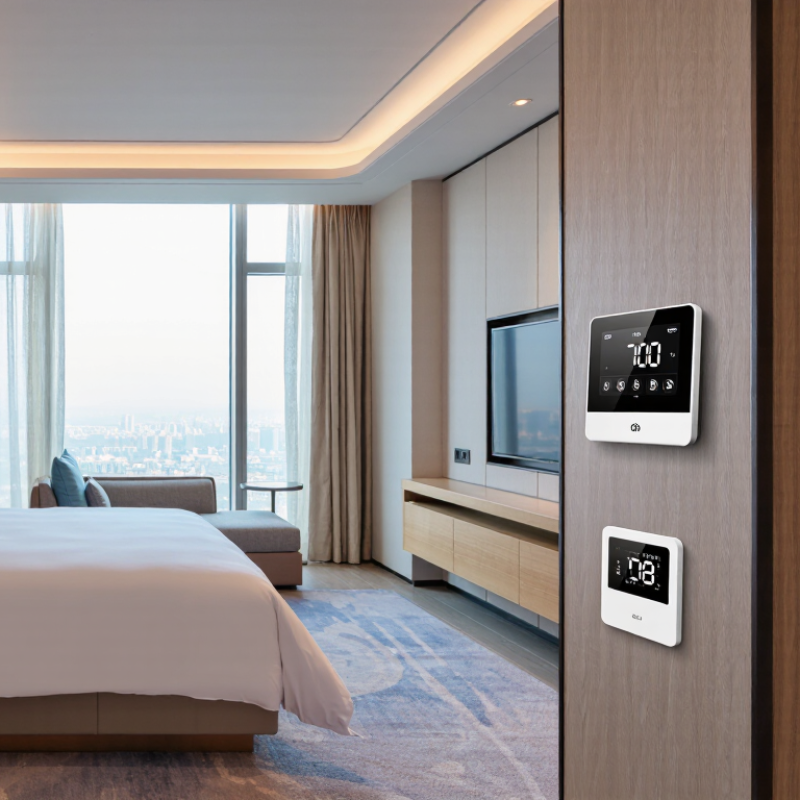
In hotels, thermostats link room comfort with guest expectations and daily operating costs. A clear interface lets guests adjust the temperature without calling the front desk. During vacancy, schedules or occupancy sensors can limit unnecessary heating and cooling. Yet a quiet guest may be mistaken for an absent one. That happens.

In commercial buildings, thermostats help maintain steady conditions across offices, meeting rooms, and shared areas. Connected systems can coordinate temperature settings with ventilation equipment and operating schedules. Building Automation Solutions can give facility teams a central view of equipment status and room conditions. Still, a sensor in direct sunlight may report misleading readings, so placement and calibration matter.

In Smart Homes, thermostats can follow household routines and allow adjustments from a wall control or phone. A gradual change before occupants arrive may feel more comfortable than a sudden blast of heat. Automation is useful, but routines change, and schedules can become outdated. A quick manual override should remain easy to find.

How Thermostats Measure and Control Indoor Conditions

A thermostat measures indoor temperature with a sensor, often near its display or behind a small vent. It compares that reading with the setpoint chosen by an occupant or building schedule. Placement matters: direct sunlight, a draft, or a lamp can make the sensor read warmer or cooler than the occupied area. Small details matter. Some systems also measure humidity or use occupancy signals, but these features vary by project.

When the measured temperature moves beyond the control range, the thermostat can call for heating or cooling. It may switch equipment directly, or send a command to a controller, valve, or networked system. A built-in delay or temperature deadband can reduce rapid cycling. Not always. Poor sensor placement or a schedule that ignores real use can still leave a room uncomfortable. In hotels, room-level control lets guests adjust their space while shared areas follow separate schedules. Commercial buildings may use multiple sensors and zones, since a sunny meeting room and a shaded corridor behave differently. In a Smart Home, connected controls can adapt schedules, but sensor data is only useful when it reflects the rooms people actually use. A careful commissioning check—comparing thermostat readings with a reliable handheld thermometer—can reveal problems before they become routine.

Main Thermostat Types and Their Features

Thermostats range from basic manual models to programmable and smart controls. Manual units offer simple temperature adjustment, but little scheduling. Simple, but limited. Programmable models follow set times, useful for offices with predictable hours. Smart thermostats can use occupancy sensors, remote adjustments, and learning schedules. In hotels, room-level controls help guests set comfort, while central systems let staff monitor shared spaces. Commercial buildings often combine zoning with central control to manage different floors or areas.

The United Nations Environment Programme’s 2024 Global Status Report for Buildings and Construction estimates that buildings and construction used 32% of global energy and produced 34% of energy-related emissions in 2022. Better control matters.

The U.S. Department of Energy says turning temperatures back 7–10°F for eight hours daily can save up to 10% annually on heating and cooling. Actual savings depend on climate, equipment, and how people use rooms.

For projects combining Building Controls And Solutions, match thermostat features to the building’s daily rhythm. A hotel room may need easy guest overrides; a meeting room may benefit from occupancy-based setbacks. Still, sensors can misread a quiet, occupied space. I would test schedules and sensor placement before scaling up. Comfort complaints are useful data, not just noise.

Thermostats for Hotel Room and Building Management

Hotel room thermostats should feel simple to guests and useful to building teams. A clear display, responsive controls, and a sensible temperature range reduce confusion at check-in. In an occupied room, a guest may adjust the setting several times before settling in. Small details matter. Place controls away from direct sunlight, lamps, and supply-air drafts, which can distort temperature readings.

For building management, networked thermostats can report room conditions and support schedules for vacant spaces. Occupancy data may help reduce unnecessary heating or cooling, while still allowing a returning guest to enter a comfortable room. Staff should be able to review alarms and adjust settings without walking floor by floor. Reliable results depend on correct sensor placement, stable connectivity, and careful commissioning. A poorly tuned schedule can create complaints faster than it saves energy.

Hotel layouts and guest habits vary. A setting that works in a meeting room may not suit a corner suite with afternoon sun. Review temperature trends alongside maintenance reports, then adjust gradually. Not every problem is a thermostat problem; blocked vents or faulty equipment can produce the same symptoms. Leave room for staff feedback, because the data alone may not explain why one room stays warm.

Thermostats for Commercial Buildings and Smart Homes

Thermostats for commercial buildings and Smart Homes must respond to how people actually use each space. The International Energy Agency reports that buildings account for about 30% of global final energy consumption. That makes reliable temperature control more than a comfort feature. In an office, a sunny meeting room may need different scheduling from a shaded corridor. Small details matter.

Commercial systems can coordinate schedules, occupancy sensors, and temperature zones, while home thermostats typically focus on simpler routines and room-level comfort. The U.S. Department of Energy says setting a thermostat back by 7–10°F for eight hours daily can save up to 10% a year on heating and cooling. Results depend on the building, equipment, and occupants. A sensor placed beside a supply vent may read a misleading temperature. But not everywhere.

Automated Building Control Solutions can help link thermostats with ventilation and other building controls, provided the setup matches the site. For hotels, avoid abrupt setbacks in occupied rooms; guest comfort remains essential. For homes, clear schedules and easy manual overrides prevent frustration. A useful commissioning check compares displayed temperatures with a separate room thermometer. Controls are not magic. Even a well-designed system needs periodic review as room use changes.

How to Select, Install, and Maintain a Thermostat

Choosing a thermostat begins with the building’s heating and cooling system, not a feature list. Check system compatibility, room use, and who will adjust the controls. In hotels, guest rooms may need clear, simple settings, while shared spaces often benefit from scheduled temperature changes. Small details matter. A thermostat placed in direct sun or beside a supply vent can misread the room and trigger needless heating or cooling.

Before installation, confirm wiring and control requirements with a qualified technician. Mount the unit away from windows, kitchens, and other heat sources, then test it through a full heating and cooling cycle. In larger buildings, label zones clearly and keep a record of schedules. Smart Home Solutions can connect room controls with broader automation, but added features are useful only when staff and occupants can operate them. That balance is easy to underestimate.

Maintenance is usually straightforward, though it is often postponed. Replace batteries when needed, gently remove dust, and check displayed temperatures against a reliable room thermometer. Review schedules when occupancy patterns change, and investigate repeated comfort complaints rather than lowering every setpoint. There is no perfect setting for every room. A shaded corner may feel comfortable while a sunny desk stays warm, so sensor placement and real room use deserve another look.

Thermostat Solutions for Hotels, Commercial Buildings and Smart Home Projects - How to Select, Install, and Maintain a Thermostat

Application Suitable Control Approach Key Selection Checks Installation and Commissioning Maintenance and Operational Checks
Hotel guestroom with fan-coil unit (FCU) Room thermostat or room controller matched to the FCU’s heating and cooling valves and fan-speed control. Confirm the FCU control voltage, number of fan speeds, valve type, heating/cooling arrangement, and whether the system uses two-pipe or four-pipe changeover. Follow the equipment wiring diagram. Check that each fan speed and valve output operates correctly, and verify seasonal changeover settings before occupancy. Inspect controls and room sensors during planned room checks. Confirm displayed room temperature is plausible and investigate recurring comfort complaints or control faults.
Hotel room with occupancy-based setback Room controller using a supported occupancy, door, or keycard signal to adjust the temperature setpoint when the room is unoccupied. Check compatibility with the HVAC controls and the property’s room-management system. Define permitted setback limits and the behavior on guest arrival. Configure and test occupied and unoccupied modes, recovery behavior, and any connection to room-management equipment. Do not rely on occupancy setback as a substitute for required ventilation or freeze protection. Periodically test occupancy inputs and confirm rooms return to the intended comfort settings. Review alarms and overrides with facilities staff.
Commercial office with packaged rooftop equipment Programmable or networked thermostat designed for the specific heating and cooling stages of the packaged unit. Verify equipment type, number of heating and cooling stages, control voltage, required sensors, and whether central monitoring or scheduling is needed. Install in a representative location away from direct sunlight, drafts, exterior doors, and heat-producing equipment. Test each operating stage and the fan mode. Review schedules at seasonal changeover. Check sensor readings and control connections, and investigate short cycling or persistent temperature differences.
Commercial building with multiple zones Zone thermostats coordinated with the building automation system (BAS), where the controls and communication interface are compatible. Confirm zone equipment, control sequence, network requirements, supported protocol, and who will manage schedules and setpoints. Protocol support must be verified for the specific devices. Label zone wiring, configure addresses and control sequences as required, and test commands, status reporting, alarms, and local operation with the BAS integrator. Check communications, alarms, schedules, and representative zone temperatures on a planned maintenance cycle. Keep configuration records current after changes.
Smart Home with one heating and cooling zone Connected thermostat compatible with the home’s HVAC system and the desired app or home-automation functions. Check system type and wiring before purchase. Many connected thermostats need a common wire or another approved power arrangement; requirements vary by model and equipment. Switch off HVAC power before handling wiring. Match each conductor to the equipment and thermostat terminals using the wiring diagrams, then configure system type and test heating and cooling. Keep firmware and schedules up to date where appropriate. Check temperature readings, network connection, and batteries if the device uses them.
Smart Home with multiple independently controlled zones A compatible multi-zone control system with a thermostat or room sensor for each zone. Confirm the existing zone panel or equipment supports the proposed controls. Decide whether each area needs a thermostat, a remote sensor, or both. Assign each thermostat and sensor to the correct zone. Test calls for heating and cooling from each zone and confirm dampers or zone valves respond as intended. Check sensor placement and zone operation, replace batteries when indicated, and review comfort settings when room use changes.
Hydronic or radiant heating project Thermostat specifically rated for the heating equipment and its control method; floor-temperature sensing may be needed for some radiant systems. Confirm whether the system uses a boiler, heat pump, electric heating, or a zone valve, and whether the control requires an air sensor, floor sensor, or both. Install the correct sensor in the location specified for the system. Set appropriate operating limits and verify the heating call at the zone or equipment controller. Check sensor readings and zone response. Have the heating equipment and hydronic components serviced according to their own maintenance instructions.
Electric resistance heating Line-voltage thermostat specifically rated for the heater’s voltage and electrical load. Do not assume a low-voltage HVAC thermostat is suitable. Verify the circuit voltage, load rating, pole configuration, and local electrical requirements. Have a qualified person confirm the circuit is de-energized and make connections according to the thermostat and heater instructions. Test switching and temperature control. Look for abnormal operation, damaged controls, or loose wall mounting. Electrical inspection or repair should be performed by a qualified person.
General selection and maintenance practice Choose controls based on equipment compatibility, required functions, operating environment, and the property’s support capabilities. Compare wiring and power needs, sensor options, scheduling, user access, accessibility, network needs, and the availability of clear operating documentation. Use the equipment manufacturer’s instructions and applicable codes. Record the wiring, settings, sensor locations, and any BAS or room-management connections. Set an inspection schedule suited to building use. Verify temperature accuracy, schedules, batteries, communications, and control response; investigate repeated overrides or comfort issues.

Important: Thermostat wiring and compatibility vary by HVAC equipment. Always check the equipment and thermostat documentation before installation; use a qualified HVAC or electrical professional when required by the system or local code.

How H11F Smart Access Panels Simplify Multi-Lock Building Security with Tuya Cloud

H11F Smart Access Panels simplify multi-lock building security by bringing different locking devices into one coordinated control system. They support magnetic locks, electric bolts, and fingerprint locks, allowing property managers to control entrances according to the needs of apartments, offices, and gated communities. With flexible compatibility, the panels can connect smoothly with existing Building Control Systems while providing reliable and efficient access management.

Cloud connectivity enables authorized managers to monitor and operate access points remotely from different locations. This makes daily administration more convenient, especially for buildings with multiple entrances or separate security zones. Access permissions can be customized for residents, employees, visitors, or service personnel, helping each property establish a practical security strategy without relying on a one-size-fits-all setup.

For stable installation, the panels support wired connections with smart central control systems, while a dedicated outdoor intercom unit improves communication between visitors and occupants. The solution can be adapted to various building layouts and security requirements, with scalable configurations supplied directly by experienced manufacturers in China.

FAQS

How does a thermostat measure indoor temperature?

A sensor reads the nearby air temperature. It compares that reading with the selected setpoint. The reading may not represent the whole room.

Why does thermostat placement matter?

Sunlight, lamps, and air drafts can distort the sensor reading. A bright window may make the thermostat report excessive warmth. Small details matter.

What happens when room temperature leaves the control range?

The thermostat requests heating or cooling. It may operate equipment directly or send a command to another controller. A built-in delay can reduce rapid switching.

Why can a room still feel uncomfortable?

Poor sensor placement, blocked vents, or faulty equipment may cause discomfort. An unrealistic schedule can also ignore actual room use. Not always the thermostat.

How do hotel room thermostats support guests?

Clear displays and responsive controls make adjustments easier. Guests may change the setting several times before feeling comfortable. The controls should not sit beside a lamp.

How can building teams manage many rooms?

Networked thermostats can report room conditions and support vacancy schedules. Staff can review alarms without visiting every floor. Stable connectivity still matters.

Can occupancy information improve temperature control?

Occupancy signals may reduce heating or cooling in empty rooms. A returning guest can still enter a comfortable space. The result depends on accurate data.

Why do different building zones need different settings?

A sunny meeting room may warm faster than a shaded corridor. Separate sensors and zones can respond to those differences. One schedule may not fit every space.

How should thermostat accuracy be checked?

Compare its reading with a reliable handheld thermometer. Check the occupied area, not only the wall display. This simple test can expose routine errors.

What should teams review before changing thermostat settings?

Review temperature trends, maintenance reports, and staff feedback together. A warm room may have a blocked vent instead. Data helps, but it does not explain everything.

Conclusion

Thermostat Solutions help hotels, commercial buildings, and smart homes maintain comfortable indoor environments while managing energy use. Thermostats measure conditions such as room temperature and use that information to control heating and cooling equipment. Depending on the model, they may offer simple manual settings, programmable schedules, or smart features that adjust operation based on occupancy, user preferences, or remote commands.

In hotels, thermostats can support guest comfort and coordinated room or building management. Commercial buildings may use them to manage different zones and respond to varying schedules, while smart homes can provide convenient, personalized climate control. Choosing a thermostat involves considering the building type, system compatibility, desired features, and ease of use. Proper installation helps ensure reliable performance, and routine maintenance—including checking settings and sensors—can keep the system operating effectively over time.

Blog Tags:

    Emily

    Emily

    Emily is a dedicated marketing professional at Shenzhen X-focus Co., Ltd. (AISpeaker), a leading manufacturer of smart home panels in China. With her extensive knowledge of the company's product offerings, including smart central control panels, background music panels, and intercom systems, she......
    Previous How to Choose an ODM Smart Panel for Your Business?
    Next Smart Home Control Panels: A Complete Guide for Brands and System Integrators