Leave Your Message
0%

An IP Video Intercom isn't just about seeing who's at the door—though that's a big part of it. It's basically a whole setup that hooks up a camera, a mic, a speaker, and even the door release controls, all through your network. And you know that classic advice from security expert Bruce Schneier? He always says, "Security is a process, not a product." That really rings true here. You can't just install it and forget it. You gotta think about how you set it up and keep tweaking it over time. Sure, getting a crisp image is nice, but you also need decent audio, reasonable access permissions, and a network connection that doesn't drop out on you. It's the whole package that matters.

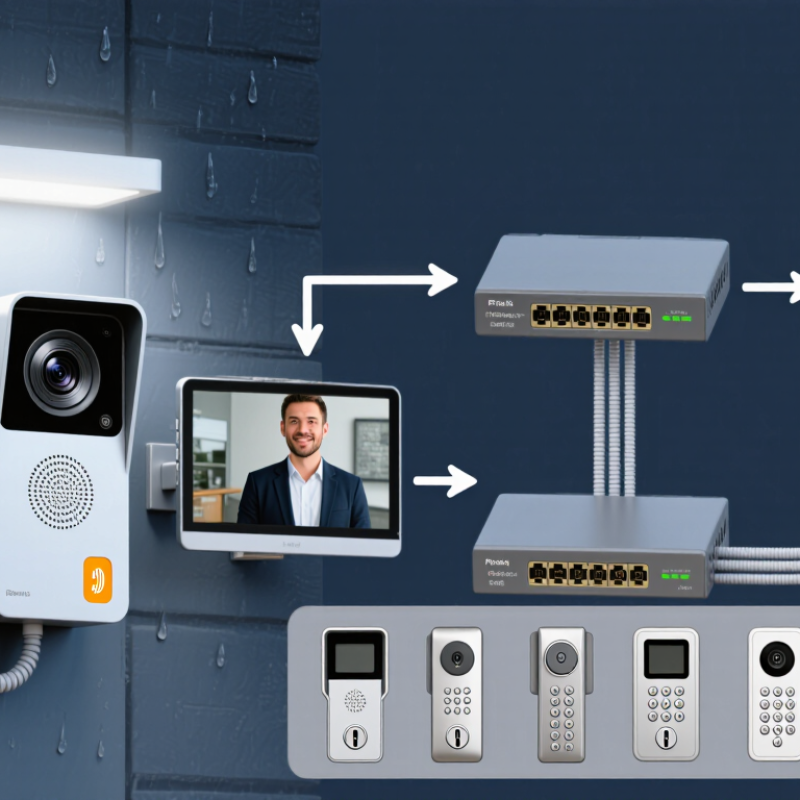
So, here's the thing—hardware really makes or breaks the day-to-day experience. That entrance station outside? It's got to be tough, dealing with rain, bright sun, and constant use. Inside, residents can just use a monitor or their phone to buzz people in and see who's at the door. Of course, you need the network switches, cabling, and compatible locks to tie it all together. But it's the small stuff that often trips you up: if the mic is too close to the speaker, you'll get that annoying echo, and if the lighting's poor, you can't even see who's ringing. You'd think all these video door phone video products are pretty much the same, right? Well, they do share those core functions, but here's the kicker: compatibility and user experience can really differ from one model to the next.

So, this guide is basically about the key features, hardware, and what OEMs can do for your specific project. We'll dig into the practical stuff—like image quality, recording, app support, and what you need for integration. And yeah, OEM customization covers a lot: branding, the enclosure, interfaces, and picking which software features to include. But here's the thing—just because you have more options doesn't mean you'll end up with a better system. You've got to pay equal attention to compatibility, testing, and having dependable support. Honestly, some issues only show up after you've installed everything, and by then it's a headache. That's something to keep in mind. Honestly, before you commit to a setup, you should really check how it behaves under real operating conditions. I mean, you don't want to get caught off guard later.
IP Video Intercom System: Key Features, Hardware Components and OEM Options

What Is an IP Video Intercom System?

An IP video intercom system connects a door station to indoor monitors or mobile devices through an internet protocol network. At the entrance, a camera, microphone, speaker, and call button capture a visitor’s image and voice. The system sends that information as digital data, allowing a resident or staff member to see and speak with the caller before unlocking a connected door. It is more than a camera at the door. Network quality, power, and setup all affect the experience.

A typical installation uses Power over Ethernet cabling, though some components may connect wirelessly. In an Apartment Video Intercom System, the door station may serve several units, while each resident receives calls on a room monitor or phone. Grand View Research’s 2024 report estimated the global video intercom devices market at about USD 3.6 billion in 2023, with an 8.1% compound annual growth forecast for 2024–2030. That growth reflects wider adoption, but it does not guarantee a smooth installation. A weak network can delay video, and poor camera placement may leave faces in shadow. Small details matter. Operators should also review user access and device updates regularly; these steps are sometimes overlooked.

How an IP Video Intercom System Works

An IP video intercom converts a visitor’s call into digital audio and video that can travel across a local network. When someone presses the outdoor station, its camera captures the entrance and its microphone records speech. The system sends these signals to an indoor monitor or an authorized mobile device. Then the call begins.

A network switch or router directs the data to the selected endpoint, while Power over Ethernet can carry power and data through one cable. This can simplify wiring, though cable length and network quality still matter.

During a conversation, a resident can see and speak with the visitor, then trigger the door release if the installation includes a compatible lock interface. A Video Door Phone System may also save images or call events, depending on its settings and storage design.

Small delay, big annoyance.

Congested Wi-Fi, weak cabling, or poor camera placement can make a clear system feel unreliable. In practice, test calls from different rooms and check the view at night, not just during installation.

Still, a neat wiring diagram rarely reflects every building; older walls and shared network equipment can complicate setup. A careful installer should verify power, network access, audio, video, and door-release operation before handover.

Key Features of IP Video Intercom Systems

A capable IP video intercom gives residents a clear view of visitors before they answer. Live video, two-way audio, and door-release control are core features. A wide-angle camera can capture more of a porch, but placement still matters. Aim it toward the visitor’s face, not a bright window. Details matter. Noise reduction helps when traffic or wind makes speech difficult, though no microphone removes every sound.

Network performance shapes the daily experience. Power over Ethernet can carry power and data through one cable, reducing wiring at the entry point. Where wireless connections are used, signal strength should be checked at the actual mounting location. Encrypted communication, user permissions, and access logs help protect conversations and entry records. Not always. Logs are useful, but they need sensible retention settings and restricted access.

Remote answering lets an authorized resident speak with a visitor when away from home. Some systems also support mobile alerts, multiple indoor stations, and integration with cameras or access controls. During selection, check image quality in low light, app responsiveness, and compatibility with the existing network. A long feature list can look impressive; in practice, slow alerts or awkward controls quickly become frustrating. Verify these functions under real site conditions.

Core Hardware Components and Their Roles

An IP video intercom connects an outdoor entrance station with an indoor monitor or mobile client. The outdoor station usually combines a camera, microphone, speaker, and call button. Some models add a keypad or card reader. A wide-angle camera helps show a visitor standing close to the door, but poor placement can still hide faces. Small details matter.

Tips: Check the camera view at eye level and test speech from both sides of the entrance. Listen for echo with the door closed. A quick bench test may not reveal noise from a busy hallway.

Inside the system, a network interface carries audio and video, while a PoE switch can provide both data and power over one cable. The indoor monitor displays the visitor and lets residents respond. A relay module can signal a compatible door release; confirm its electrical ratings before pairing components. Weather-resistant housings and suitable cable protection help outdoor stations handle rain and temperature changes. For OEM projects, teams can specify screen size, camera angle, button layout, and reader options. These choices affect installation and usability, so test a sample against the actual entryway. Specifications can look tidy on paper, yet cable routes and lighting often surprise installers.

IP Video Intercom System: Key Features, Hardware Components and OEM Options — Core Hardware Components and Their Roles

Hardware Component Typical Elements or Interfaces Primary Role OEM Design Considerations
Outdoor Door Station Weather-resistant enclosure, call button or keypad, camera, microphone, speaker, and network interface Captures visitor video and audio, initiates calls, and provides a user interface at the entrance. Consider mounting options, ingress protection, operating temperature, accessibility, and the intended number of call buttons.
Camera Module Image sensor, lens, and, where required, infrared illumination Provides a view of the visitor and entrance area to indoor stations or authorized client devices. Select the field of view, low-light performance, and resolution to suit the installation; verify that the lens covers the expected visitor position.
Audio Components Microphone, speaker, and audio processing circuitry Enable two-way communication between the visitor and the resident or reception desk. Allow for echo cancellation, noise handling, speaker volume adjustment, and acoustic tuning for the enclosure.
Call and Access Input Mechanical button, touch input, keypad, card reader, or other compatible credential reader Lets visitors place a call and, in supported configurations, lets authorized users submit access credentials. Choose the input method and credential technology to match the building’s access policy and user needs.
Processing and Control Board Processor, memory, storage, and control interfaces Runs device software and manages video, audio, network communication, user input, and connected peripherals. Plan processing capacity, software update support, device security, and component availability for the product lifecycle.
Network Interface Ethernet port, network controller, and optional wireless interface Connects system devices to the local network for calls, configuration, and supported management functions. Confirm network requirements, bandwidth needs, encryption support, and compatibility with the target installation environment.
Power Supply Power-over-Ethernet input, low-voltage DC input, or a combination, depending on the design Supplies operating power to the door station, indoor monitor, or network equipment. Match voltage and power requirements to the device and cable run. If using PoE, verify compatibility with the selected PoE standard and switch budget.
Indoor Monitor Display, microphone, speaker, call controls, and network or bus interface Allows occupants or staff to view and speak with visitors and use supported door-release functions. Consider screen size, mounting style, user interface, accessibility, and whether the design supports multiple indoor stations.
Door-Release Relay or Access Controller Relay output or controller interface; may connect to an electric strike or electromagnetic lock system Triggers an approved door-release action after an authorized user grants access. Check the lock’s electrical ratings and required fail-safe or fail-secure behavior. Coordinate installation with the access-control design and applicable safety requirements.
Network Switch and Router Ethernet ports, switching functions, and routing or firewall functions Connect system endpoints and provide network connectivity between devices and permitted services. Size port count and PoE capacity for the installation; define network segmentation, access rules, and any required remote-access controls.
Cabling and Mounting Hardware Ethernet or other specified cable, connectors, back boxes, brackets, and weather seals Provides physical connectivity and secure installation for indoor and outdoor equipment. Choose cable and mounting materials for the site conditions, installation distance, building structure, and local electrical and building requirements.

Component selection and supported interfaces vary by system architecture. Confirm electrical ratings, network requirements, installation conditions, and local codes for each project.

Network Integration, Security, and Compatibility

An IP video intercom works best when its network role is planned before devices reach the entrance. Check PoE budgets, cable distance, and switch capacity; a camera, call panel, and indoor monitor all draw power and bandwidth. Keep intercom traffic on a managed VLAN where practical, and limit administration to trusted devices. This reduces noise. It does not replace strong passwords, timely firmware updates, or encrypted connections. Ask the installer to document network ports and recovery steps, not just leave a working screen.

Compatibility needs testing, not assumptions. SIP or ONVIF support can help, but it does not guarantee every feature will work across systems. Confirm that calling, two-way audio, relay control, and event logs function with the intended monitors and management software. Test mobile access on the actual network, including weak Wi-Fi near the front door. An Onetouch Video Door Phone may offer OEM options such as customized interfaces, housing, or integration APIs. Request a sample setup and test routine before approving changes; I have seen small interface differences create avoidable support work. Keep security updates and future device compatibility in the specification.

OEM Options for Customizing IP Video Intercoms

OEM options let installers and property developers adapt an IP intercom to real site conditions. A Video Door Phone can be configured with a different screen size, camera angle, call button layout, or mounting style. At a narrow entryway, a wider camera view may matter more than a larger display. For a shared building, clear unit labels and accessible controls can reduce missed calls. Small details matter.

Connectivity and software need equal attention. An OEM configuration may support wired Ethernet, Wi-Fi, or power over Ethernet, depending on the installation. Confirm compatibility with existing door locks, indoor monitors, and management systems before selecting components. Firmware can also be tailored with custom menus, user permissions, and call settings. Keep changes documented. Otherwise, updates and troubleshooting become harder later.

Ask the supplier for sample units, interface specifications, and a written test plan. Check audio clarity beside a busy street, not only in a quiet office. Test night images, network recovery, and repeated button use. One detail is easy to overlook: custom housing can affect heat and water resistance. Review the finished assembly, not just its individual parts. Some features look useful on paper but add little in daily use.

IP Video Intercoms: Estimated Video Bandwidth by Resolution

Typical per-stream planning estimates for H.264 video. Actual bandwidth varies with frame rate, scene complexity, and encoder settings; check device specifications when sizing a system.

Use these estimates as a starting point when selecting network hardware for door stations, indoor monitors, and other IP intercom components. OEM configurations may support different resolutions and encoding settings.

Smart Home Video Intercoms: Market Insights from Grand View Research’s Smart Home Market Report

Smart home video intercoms reflect a broader shift toward connected, convenient home access. Viewed through the smart home market insights highlighted by Grand View Research, their appeal lies in combining visitor communication with security and Home Automation in a single system. A one-tap video call links outdoor stations and indoor terminals, while a 2MP camera with wide dynamic range helps provide clear images across changing light conditions. Multiple unlocking options—including facial recognition, passwords, IC cards, and NFC—give households flexibility in managing entry.

For manufacturers and buyers comparing Residential Intercom Systems, practical integration is a key differentiator. Voice control through compatible mobile assistants supports hands-free unlocking, while two dry-contact outputs and an expandable four-relay setup can connect with other devices. The 8-inch IPS display can be personalized with household photos or a logo. Elevator calling and access-control integration add convenience in multi-unit settings, and customized scenes can trigger actions such as adjusting lights or thermostats after entry. Smart shortcuts make frequent tasks easier to run, while Visitor and Family modes let residents tailor notifications and access preferences to different situations.

FAQS

What is an IP video intercom system?

It connects an entrance station to indoor monitors or mobile devices over a network. Residents can see and speak with visitors before releasing a connected door.

What hardware does a typical system use?

The entrance station usually has a camera, microphone, speaker, and call button. Indoor monitors, network equipment, and sometimes a relay complete the setup.

How can Power over Ethernet help?

It carries power and data through one cable, which can reduce wiring near the entrance. One cable helps. Network quality still matters.

Which features are most useful?

Live video, two-way audio, door-release control, and mobile alerts are common features. Check how quickly alerts arrive in real conditions.

How should the entrance camera be positioned?

Aim it toward a visitor’s face, ideally near eye level. Avoid pointing it at a bright window. Shadows hide faces.

What should installers test before setup is complete?

Check the network signal where the station will be mounted. Test speech from both sides, including with the door closed.

How can access information be handled carefully?

User permissions, encrypted communication, and access logs can help protect conversations and entry records. Restrict log access and review retention settings.

What should be checked before connecting a door release?

Confirm that the relay’s electrical ratings match the release. Check cable routes and weather protection, too; plans can miss awkward details.

Does market growth guarantee an easy installation?

No. A 2024 market report estimated a 2023 value of about USD 3.6 billion and forecast 8.1% annual growth for 2024–2030. Growth does not prevent weak signals or poor camera placement.

Conclusion

An IP Video Intercom system connects a door station, indoor monitors, and other compatible devices through an IP network, allowing residents or staff to see and speak with visitors and manage entry remotely. When a visitor calls, the system sends audio and video to a designated screen or mobile interface, where an authorized user can respond and activate a connected door-release function.

Key features may include clear two-way audio, live video, remote answering, call forwarding, and integration with access control or building-management systems. Core hardware typically includes a camera and call panel, microphone and speaker, indoor monitor or software interface, network equipment, and an electric locking device. Secure configuration, reliable connectivity, and compatibility with existing infrastructure are important considerations. OEM options can adapt the system to project needs, including enclosure design, screen size, interface language, hardware configuration, and software features. Together, these choices help create a practical, scalable intercom solution for homes, offices, and multi-unit buildings.
Blog Tags:

    Emily

    Emily

    Emily is a dedicated marketing professional at Shenzhen X-focus Co., Ltd. (AISpeaker), a leading manufacturer of Smart Home Panels in China. With her extensive knowledge of the company's product offerings, including smart central control panels, background music panels, and intercom systems, she......
    Previous 10 IP Video Intercom Buying Tips for Global Buyers