When you're picking an IP video intercom for a global project, it's easy to get hung up on specs like screen size and camera resolution. But honestly, that's barely scratching the surface. You've got to think about how it'll actually be installed, what the users are like, the climate, the network quality—and whether you'll get any real support down the line. A slick product page might look impressive, but it rarely shows you the practical pitfalls you'll run into on the ground.
Before you go ahead and approve that big order, it's a good idea to have your experienced purchasing team actually give the device a test run. You'll want to check how clear the voice sounds if you're near a busy entrance - like, real-world conditions, you know? Also, test out the camera in different scenarios: at night, in the rain, and with strong backlighting - that's where a lot of doorbells struggle. Don't forget to dig into the mobile access, visitor logs, relay control, and how well it integrates with your existing security systems. And one more thing - make sure the Video Door Phone Video stream stays stable even when your bandwidth is limited. That's a common pitfall. You know, it's the little things that really make a difference. Take a delayed call, for instance – it can seriously irritate residents and end up piling more work on the reception staff. Funny how such a small hiccup can snowball like that.
You know, cybersecurity really deserves just as much attention as anything else. I mean, think about it—have you asked about encryption, how they handle firmware updates, what their password policies look like, who gets user permissions, and whether they actually have a process for vulnerability reporting? Also, it's worth checking if their installation guides actually respect your privacy, especially if you're operating in different markets, because that can vary a lot. A good supplier should be upfront with clear specs, documented testing, and they should have a solid plan for spare parts, plus be responsive when you need tech support. Certifications are nice and all, but honestly, they don't replace you actually testing things yourself in the real world.
You know, it's easy to get caught up in chasing the lowest unit price. But that can backfire—suddenly you're shelling out for replacements, training, and dealing with service delays. I've personally watched projects go sideways because the gear looked great in the brochure but didn't actually fit the building. Trust me, that's a lesson you don't want to learn the hard way. So, here's a guide with ten practical tips for buyers around the world. But hey, even this won't cover every weird quirk a site can throw at you. Look, if you want a dependable IP video intercom setup, you can't skip the basics. You've got to run careful trials, keep things transparent with your supplier, and make sure you document all the acceptance tests. It might seem like a lot, but honestly, it's what makes the difference between a smooth deployment and a nightmare down the road. I've seen too many projects go sideways because they rushed through this part.
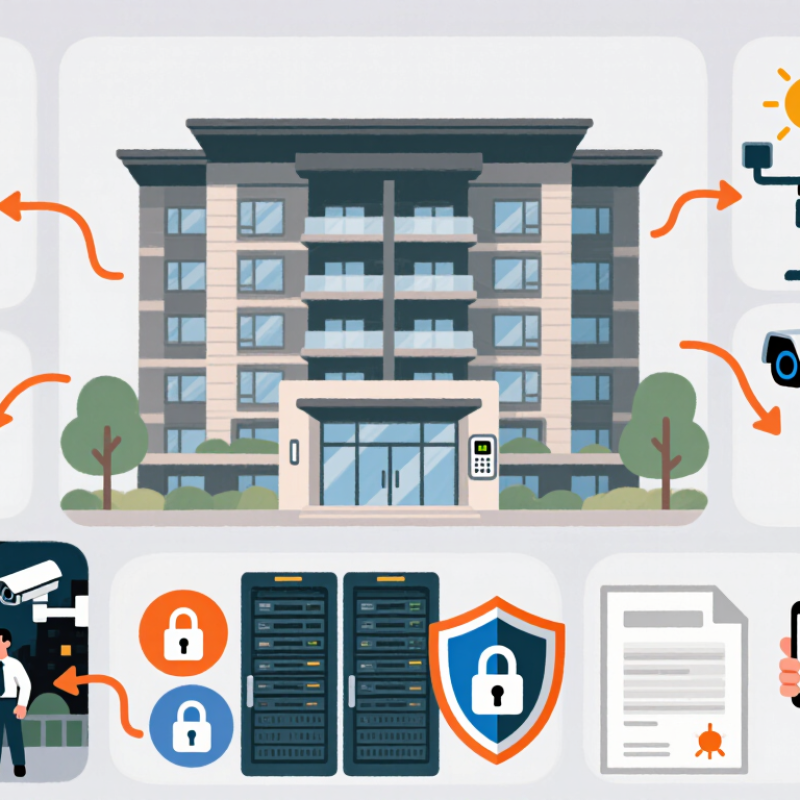
An IP video intercom system combines a camera, microphone, speaker, door relay, and network connection. For an Apartment Video Intercom System, the core task is simple: identify a visitor, communicate clearly, and release the correct entrance remotely. Most systems use Power over Ethernet, reducing separate wiring near each apartment door.
According to Grand View Research’s 2024 access control report, the global access control market is expected to grow at approximately 8% annually through 2030. This growth reflects demand for connected entry management, not just better cameras. Buyers should check SIP compatibility, two-way audio quality, low-light performance, and mobile notification delays. A sharp image means little if speech breaks up beside a busy street.
Small details matter. Look for encrypted communication, role-based permissions, event logs, tamper alerts, and secure firmware updates. NIST’s Cybersecurity Framework emphasizes asset control, protection, detection, response, and recovery; these ideas apply directly to networked intercoms. A device should also support VLAN separation and reliable offline operation when the internet fails.
I have seen wide-angle cameras miss faces under bright ceiling lights. Wider is not always better. Installers should test viewing height, glare, echo, and relay timing inside the actual lobby. According to MarketsandMarkets’ 2024 smart building report, building automation increasingly depends on interoperable systems. That sounds efficient, but compatibility claims need testing. A glossy specification sheet cannot replace a ten-minute door-side trial.
Before choosing an IP video intercom, define how people and vehicles move through the site. Map every entrance, service gate, lobby, and restricted doorway. Note the distance between the entrance and the monitoring desk. A ten-meter cable run is simple; a 200-meter route may need different network planning. Record lighting conditions, rain exposure, background noise, and nighttime visibility.
Tip: Test the busiest entrance during its worst conditions. Check whether faces remain clear when sunlight hits the camera. Measure how quickly calls connect from the gate to the assigned staff member. Site surveys often reveal practical issues that product sheets miss. I have seen teams overlook delivery entrances, then add equipment after installation. That delay costs time.
Define user roles before comparing features. Residents, reception staff, security teams, and maintenance workers may need different permissions. Decide whether visitors require two-way video, temporary access, or only voice communication. Confirm the number of simultaneous calls and the expected daily traffic. Also check existing network capacity, power availability, recording needs, and local privacy requirements. Keep the plan realistic. A few assumptions may still be wrong. Leave space for future doors and changing workflows, rather than designing only for today.
A reliable IP video intercom begins with balanced video, audio, and network performance. During site evaluations, compare images in daylight, shadows, and low light. A sharp image can still fail when faces appear against a bright doorway. Look for wide dynamic range, useful night detail, and stable color reproduction. Test motion too. Excessive compression may create blocky faces or delayed door views. Ask for a live demonstration, not only sample recordings.
Audio deserves equal attention. Clear speech depends on microphone pickup, speaker volume, and echo control. Stand several meters away and speak naturally. Can the visitor hear without repeating every sentence? Test wind, traffic, and hallway noise. Full-duplex communication is valuable when both people need to speak naturally. Small speakers may sound harsh. I once trusted a specification sheet and overlooked weak audio in a tiled entrance. That mistake changed my testing routine.
Network compatibility often decides long-term reliability. Check support for standard network protocols, power requirements, bandwidth limits, and remote management options. Measure latency during busy network periods. A smooth local call may become frustrating across a congested connection. Confirm operation with existing switches, access systems, and recording platforms. Security settings also matter, including encrypted communication and controlled user access. Do not assume every network is ready. Document packet loss, recovery time, and firmware update procedures before purchase. Some tests remain incomplete, and that uncertainty should be recorded rather than hidden.
Comparing video quality, audio performance, and network compatibility through a practical procurement priority score.
The 1–10 scores are reference priorities synthesized from common enterprise procurement requirements. They are not company or brand performance data. Buyers should validate each item against site conditions, local regulations, bandwidth, lighting, and integration requirements.
When evaluating a Video Door Phone System, start with access control, not screen size. The 2024 Verizon Data Breach Investigations Report analyzed 30,458 incidents and 10,626 confirmed breaches. Credential abuse remained a leading entry point, representing 22% of breaches. Therefore, each installer, resident, and administrator should receive a unique account. Shared passwords create blind spots. Look for multi-factor authentication, role-based permissions, temporary visitor codes, and immediate account removal after staff changes.
Test the system at the entrance. Can an administrator revoke a lost phone within one minute? Does the door remain secure during network failure? Can authorized users unlock it without creating permanent logs? Audit trails should record identity, time, device, and action.
The 2024 Data Breach Investigations Report also identified vulnerability exploitation in 14% of breaches, making firmware updates and encrypted communication practical requirements. Ask how updates are signed, scheduled, and verified.
User management is often underestimated. A clean dashboard may still hide excessive permissions. Review default accounts carefully. Limit export rights. Set retention periods for video and access records. Privacy controls should support local requirements without weakening evidence quality.
I have seen teams test only successful entry. That is incomplete. Test denied entry, expired credentials, power loss, and repeated failed attempts. Perfect procedures rarely survive real buildings. Small omissions can become expensive security lessons.
Global buyers should inspect installation conditions before comparing features.
MarketsandMarkets’ 2024 Video Surveillance Market report forecasts growth from about $53 billion in 2024 to $83 billion by 2029. That expansion increases pressure on existing networks and installers.
For retrofits, measure cable routes, door thickness, mounting height, and available power. An Onetouch Video Door Phone may suit a single residence, but larger sites need PoE capacity and proper network segmentation.
Check whether the system supports ONVIF profiles, SIP calling, mobile access, and relay control. Test this onsite. Small errors become expensive.
Scalability deserves equal attention.
Grand View Research’s 2024 Smart Home market analysis indicates continued double-digit growth through 2030, suggesting more connected devices will share residential networks.
Ask whether administrators can add doors without replacing the controller. Confirm user limits, recording policies, API access, and compatibility with access-control software.
A cloud option can simplify remote management, but recurring fees and internet dependency require careful review. Local processing may reduce latency at a busy entrance.
Installation manuals often assume ideal walls and clean cabling. Real buildings rarely cooperate.
I have seen a few centimeters of missing clearance force a costly redesign. Buyers should request a pilot installation, document network performance, and verify fail-safe behavior during power or connection loss.
A polished demonstration is not enough.
A reliable Video Door Phone should survive rain, voltage changes, and repeated use at the entrance. Ask for field failure rates, warranty-return data, and tested operating temperatures. Do not rely on MTBF alone. It can look impressive while hiding installation weaknesses. Test the device with wet gloves, weak network signals, and nighttime lighting.
Cybersecurity also affects ownership cost. Verizon’s 2024 Data Breach Investigations Report found vulnerability exploitation increased by 180% year over year. Require signed firmware, secure updates, role-based access, and a clear vulnerability response process. An SBOM and penetration-test summary provide stronger evidence than general security claims. IBM’s 2024 Cost of a Data Breach Report placed the global average breach cost at 4.88 million dollars. That figure is not an intercom bill, but it shows why connected entry devices deserve careful controls.
Compliance checks should cover privacy, electrical safety, radio requirements, and data residency in each target market. Confirm whether recordings leave the country, how long they remain stored, and who can export them. Support matters after installation. Check response-time commitments, spare-part availability, firmware support duration, and installer training. Calculate total ownership cost across five years, including licenses, cloud storage, network changes, maintenance visits, and replacement units. I once underestimated labor. The hardware was inexpensive; rewiring caused the real expense.
It combines a camera, microphone, speaker, door relay, and network connection. Staff can identify visitors and communicate remotely. The system can release the correct entrance. Keep the process simple.
Map every entrance, service gate, lobby, and restricted doorway. Record cable distances, lighting, rain exposure, noise, and nighttime visibility. A 200-meter route may need different network planning. Product sheets cannot reveal every site problem.
Test face clarity under bright ceiling lights and direct sunlight. Check speech beside traffic or machinery. Measure call connection and relay timing. A sharp image is not enough.
Ask about reliable offline operation when internet service fails. Consider network separation for intercom traffic. Check power availability and backup arrangements. Offline behavior needs a real test.
Look for encrypted communication and role-based permissions. Event logs and tamper alerts can support investigations. Secure firmware updates are important. General security claims may be too vague.
Residents, reception staff, security teams, and maintenance workers may need separate permissions. Decide who can view video, answer calls, or release doors. Review temporary access carefully. Workflows may change later.
Confirm recording periods and export permissions. Check where recordings are stored and whether they leave the country. Review privacy, electrical, radio, and local data requirements. Legal details vary by location.
Include licenses, cloud storage, network changes, maintenance visits, and replacement units. Add installer training and spare parts. Rewiring can cost more than hardware. I once underestimated labor.
Test wet gloves, weak network signals, repeated calls, and nighttime lighting. Ask for failure data, warranty returns, and operating-temperature results. Do not rely on one reliability number. Real entrance testing is better.
Choosing the right IP Video Intercom begins with understanding how the system supports communication, identity verification, and controlled entry across a site. Global buyers should first define the property type, user volume, coverage areas, environmental conditions, and network infrastructure. Key comparisons include video resolution, low-light performance, audio clarity, connection stability, and compatibility with existing network standards. These factors help ensure dependable communication for both visitors and authorized users.
A complete evaluation should also consider access permissions, credential management, event records, privacy safeguards, and secure remote administration. Buyers should review installation methods, wiring requirements, integration with monitoring or building systems, and the ability to expand as site needs change. Long-term value depends on equipment durability, software and firmware support, service responsiveness, compliance with applicable requirements, and the total cost of ownership. By assessing performance, security, scalability, support, and lifecycle expenses together, organizations can select an IP Video Intercom solution that is practical, reliable, and suitable for diverse operating environments.